
UHS
2007-2017 GM, Chevrolet 4 Btn Remote FCC: OUC60270
2007-2017 GM, Chevrolet 4 Btn Remote FCC: OUC60270
Couldn't load pickup availability
Original Refurbished
FITS:
Acadia 2007-2016
Outlook 2007-2010
Traverse 2007-2017
Enclave 2007-2017
SRX 2007-2007
Suburban 2007-2011
Tahoe 2007-2014
Escalade 2007-2010
FCC: OUC60270
OE #: 15913416
Buttons Info: L,U,P,T
Programming Instructions: This information is in your Owners Manual in the
Drivers Information Center Section.
-
Insert Key and turn to ON position so you can access Driver Information Center
2. Press the vehicle information button until
PRESS TO RELEARN REMOTE KEY displays
3. Press the set/reset button until
REMOTE KEY LEARNING ACTIVE displays
4. Press and hold the lock and unlock buttons on the first keyless remote at the same
time for approximately 15 seconds. A chime will sound indicating that the remote is
programmed.
On vehicles with memory recall seats, the first remote learned will match Driver 1
and the second will match Driver 2.
5. To program additional remotes at this time repeat step 3.
This vehicle can have a maximum of eight remotes programmed.
6. To exit programming mode turn key off and remove key.
Test remote(s).
Programming Instructions:
Use this Procedure for Vehicles with Driver Information Center
1. Insert Key and turn to ON position.
2. Press the vehicle information button until PRESS TO RELEARN REMOTE KEY displays
3. Press the set/reset button until REMOTE KEY LEARNING ACTIVE displays
4. Press and hold the lock and unlock buttons on the keyless remote at the same time for approximately 15 seconds. A chime will sound indicating that the remote is programmed.
5. To program additional remotes at this time repeat step 4.
6. Turn key off and remove, test remotes.
Use this Procedure for Vehicles without Drivers Information Center
1. Insert key into ignition and turn to the on position.
2. Press the trip odometer reset stem until RELEARN REMOTE KEY displays.
3. Press and hold the trip odometer reset stem for three seconds. The message REMOTE KEY LEARNING ACTIVE will display 3. Press and hold the lock and unlock buttons on the first keyless remote at the same time for approximately 15 seconds. A chime will sound indicating that the remote is programmed
4. To program additional remotes at this time repeat step 3. This vehicle can have a maximum of eight remotes programmed.
5. turn key off and remove, test remotes.
Materials
Materials
Shipping & Returns
Shipping & Returns
Dimensions
Dimensions
Care Instructions
Care Instructions
Share
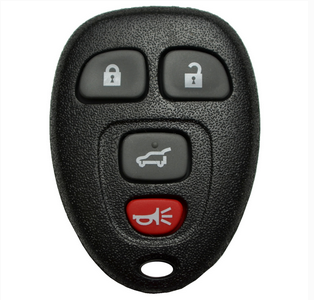
Image with text
Pair text with an image to focus on your chosen product, collection, or blog post. Add details on availability, style, or even provide a review.
-
Free Shipping
Pair text with an image to focus on your chosen product, collection, or blog post. Add details on availability, style, or even provide a review.
-
Hassle-Free Exchanges
Pair text with an image to focus on your chosen product, collection, or blog post. Add details on availability, style, or even provide a review.